Today's work
Review approvals, running tasks, today's queue and issues. Customize your assistant name and photo and save request templates.
Assistant guide →An open-source AI CLI for frontend developers.
Reuse project components, check team rules,
and test real browser interactions.
npx @choijinwon/oscode@latest --agent frontendRequires Node.js 22+. Start local commands without a model key.
Connect a model for AI code changes.
Manage tasks, review execution records and use assistant and development tools in the Web CLI. Open synthetic production line and inspection regression tools from Workspace, with Korean, English and Japanese primary controls.
Review approvals, running tasks, today's queue and issues. Customize your assistant name and photo and save request templates.
Assistant guide →Register local stdio and remote HTTP servers. Select the tools exposed to AI; execution follows existing approvals.
Connection guide →Preview HTML from chat, or connect a configured framework development server to interact with the actual app.
Framework preview →Inspect task reports and changed files recorded by file tools. Download the results for your next step.
Deliverables guide →This UI requires a running local OSCODE server. It is not a cloud assistant or an automation that runs after shutdown. Framework preview needs a configured application, dependencies and a development server.
The Web CLI menu is now called Workspace. Compare inspection policies in a synthetic production line, or save failed inspection images to check them with another model.
Inspect synthetic LOTs, wafers and equipment queues. Apply thresholds and assumed costs to fixed mock scores, save the evidence and reproduce the calculation.
Production line guide (Korean) →Open the inspection environment from Workspace → 반도체 모델 비교 (Semiconductor model comparison). Save the exact request PNG, truth rectangles and baseline predictions for false positives or missed defects.
Start a regression check →Replay saved images with the same evaluation settings. Passing requires every case to complete, no increase in either error count per case, and totals within your limits.
Capture, review and pass criteria (Korean) →These experiments use synthetic data. Production line policy comparison and image-based MLflow regression are separate features. A regression pass covers the saved failure cases; it does not establish production performance or approve deployment.
0.24.0 includes inspection failure regression and UI reliability fixes. npx @choijinwon/oscode@latest --web runs the latest version published to npm. 0.24.0 release guide ↗
AI proposes up to three bounded roles. Review the assignments before starting, then inspect lead and child agent work in one timeline.
Choose ‘Agent assignments’ above the composer. The lead agent analyzes with read-only tools and proposes roles, scope and acceptance checks.
Assignment guide →Inspect actual files read, tool inputs and outputs, approval waits and token usage. Important actions follow existing approval rules.
Inspect execution →Stop one agent or the whole group. Retry only the failed agent. Failed predecessors block downstream model calls.
Recovery and execution →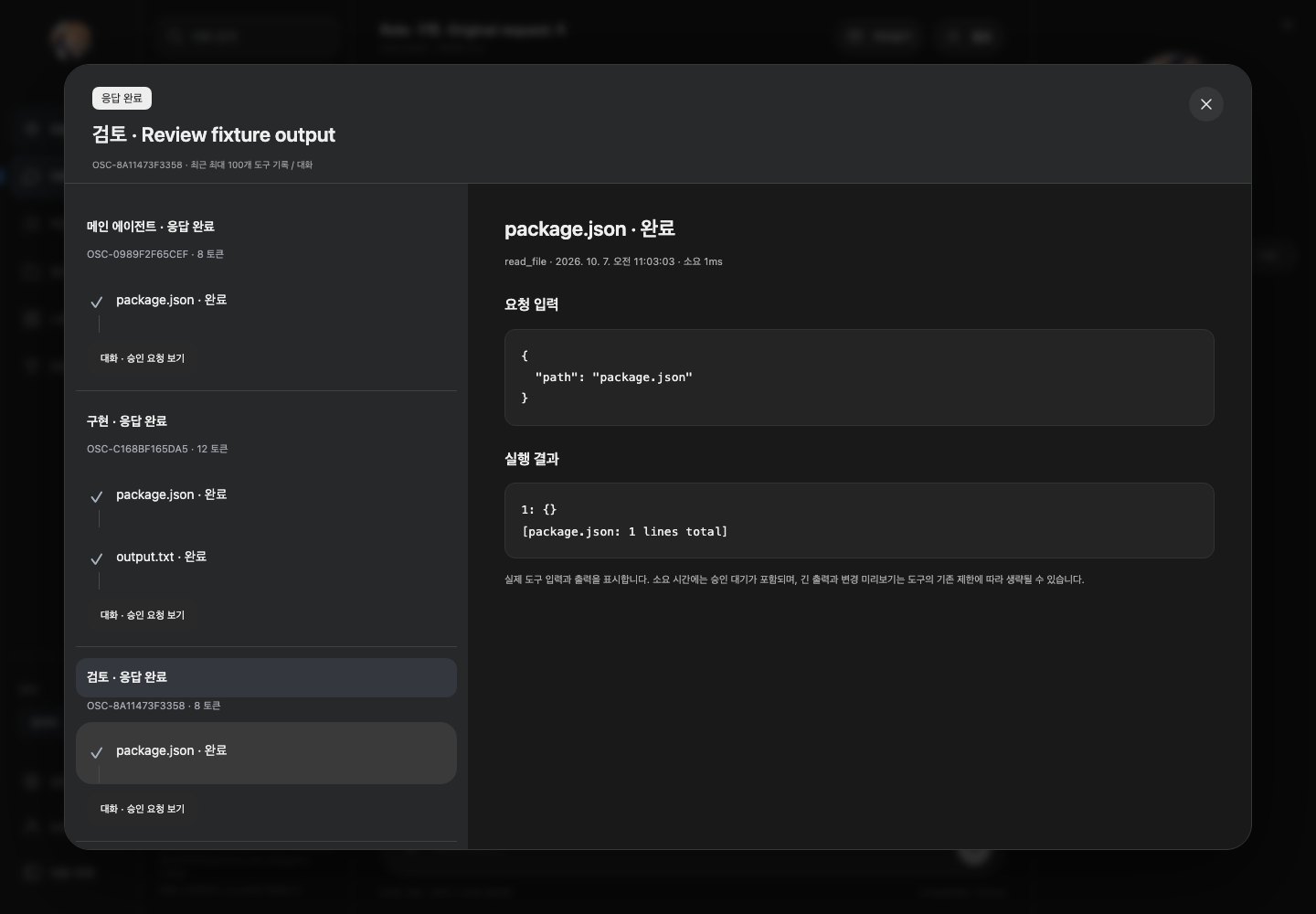
Agents run sequentially in separate conversations in the same project. No automatic merging or deployment is provided. Each role incurs model costs; preceding results are limited to 8,000 characters. A completed response does not mean checks passed.
Choose 한국어 / English / 日本語 at the bottom of the sidebar. Menus, settings and primary controls update immediately, while drafts and conversations stay unchanged. Language settings →
Inspect semiconductor classification, detection and polygon segmentation results in a workspace shaped by your model contract. Compare A/B results on the same image.
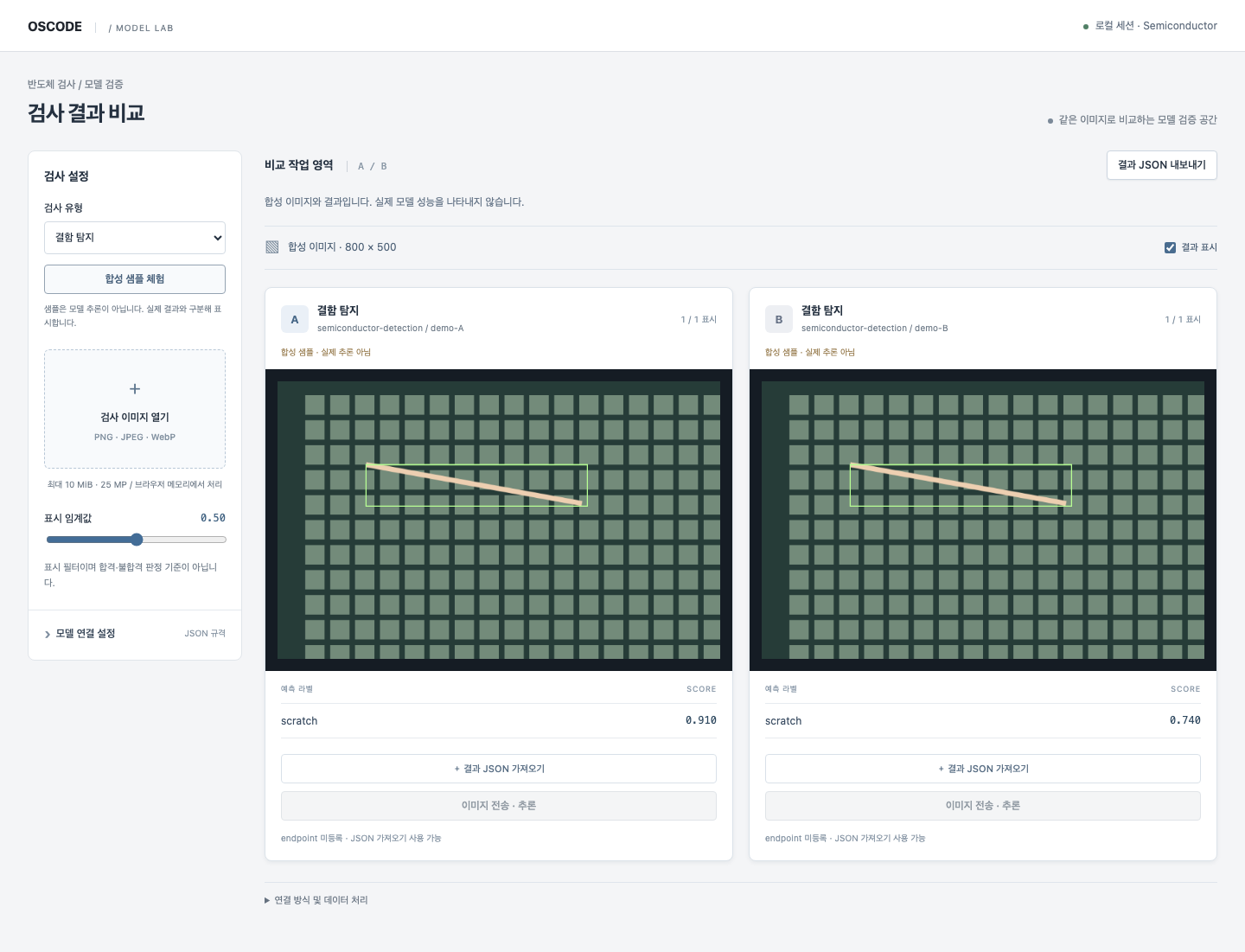
Click 모델 검사 (Model inspection) beneath the terminal input. Narrow terminals show 검사.
Open an image and register A/B model contracts. Try synthetic samples without an API key.
Review scores, bounding boxes and polygons. Adjust the display threshold or hide overlays.
Download comparison JSON with the image hash, model versions and original predictions.
Actual inference requires a separate model server. You can also import result JSON. A/B is a visual comparison, not an accuracy benchmark or automatic pass/fail decision.
Compose registered blocks with AI, run specialist workflows locally, and record quotes, deliverables and customer acceptance.
Agree on scope, output and price.
Run typed blocks with existing permissions.
Record output files and content hashes.
Record customer acceptance before invoice preparation.
Inspect the project catalog and identify reusable code.
/catalog →Check configured imports and code patterns before accepting changes.
/team-ui →Run configured browser scenarios and compare preserved UI state.
Browser verification →Export passed, failed and unverified checks.
/evidence →Choose from 40 UI starters, including mobile, admin, ERP and 10 semiconductor components. Generate code and CSS for your framework.
Explore design commands →/design select next/semi-traceImport JSON or CSV, validate coordinates and units, then inspect linked results and yield.
The other nine semiconductor starters use synthetic data. No MES connection, equipment control or automatic REST binding is included.
Data format and examples →OSCODE uses explicit local rules to prioritize relevant tools. Mixed or unmatched requests use the general route.
This is a rule-based engine, not a trained classifier. It does not grant approval or guarantee token savings. Code generation still uses your configured model.
Configure local routing →OSCODE is MIT-licensed. Model usage or subscription costs depend on your provider.
This release adds an English website and getting-started guide. Some CLI messages, generated UI labels and detailed guides remain in Korean.
No. It only covers the configured checks. Validate your application build, integration and business rules separately.